
Every class is diverse: different languages, interests, strengths, needs and ways of engaging. Traditionally, teachers plan one lesson and then adapt it for learners who struggle. Universal Design for Learning (UDL) flips this around: you design lessons from the start so that more learners can access them and succeed. This guide explains the UDL principles, shows practical classroom examples and gives you a simple way to start.
What is Universal Design for Learning?
UDL is a framework developed by CAST, a nonprofit education research organization. It is inspired by universal design in architecture: just as a ramp helps wheelchair users, parents with strollers and delivery workers, flexible lesson design helps many learners, not only those with identified needs (Meyer, Rose & Gordon, 2014). The current version is the UDL Guidelines 3.0, released in 2024 (CAST).
The three UDL principles
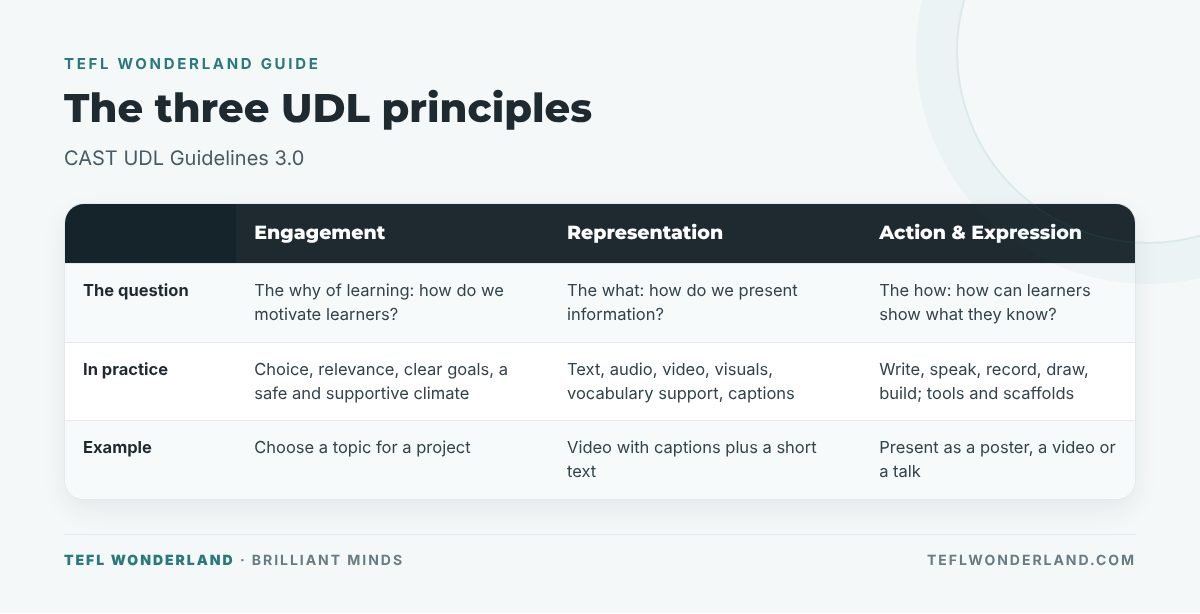
The guidelines are organized around three principles. Each asks teachers to design multiple means of:
- Engagement: the why of learning. Offer choices, make tasks relevant, set clear goals and build a safe, supportive climate.
- Representation: the what of learning. Present information in more than one way: text, audio, video, images, demonstrations, and support for vocabulary and symbols.
- Action and expression: the how of learning. Let learners show what they know in different ways, and support planning and strategy use.
UDL is not “doing everything three times”
A common worry is that UDL means planning three versions of every lesson. It doesn’t. It means anticipating barriers and building in a few flexible options. For example, a reading task can include a short audio version and a glossary; a writing task can be done as a written paragraph or a recorded explanation. Small changes, planned once, help many learners every time.
Practical UDL examples for the classroom
Engagement
- Let learners choose between two or three topics for a project.
- Connect tasks to learners’ lives, communities and interests.
- Show the learning goal and success criteria clearly.
- Use gamification, such as levels, missions and team challenges, to support motivation.
Representation
- Combine spoken explanations with visuals and written key points.
- Add captions to videos and provide transcripts.
- Pre-teach key vocabulary with pictures and examples.
- Use graphic organizers to show structure and relationships.
Action and expression
- Offer different ways to show learning: write, speak, record, draw or build.
- Provide sentence starters, checklists and templates.
- Allow digital tools such as speech-to-text where appropriate.
- Break big tasks into steps with mini-deadlines.
UDL in language teaching
UDL fits language classes especially well, because language itself can be a barrier. Use visuals and gestures alongside speech; provide audio for reading texts; allow learners to plan in their first language before speaking in English; offer a choice of speaking or writing tasks to show understanding. These options help English learners while keeping the language goal clear.
Planning a lesson with Universal Design for Learning
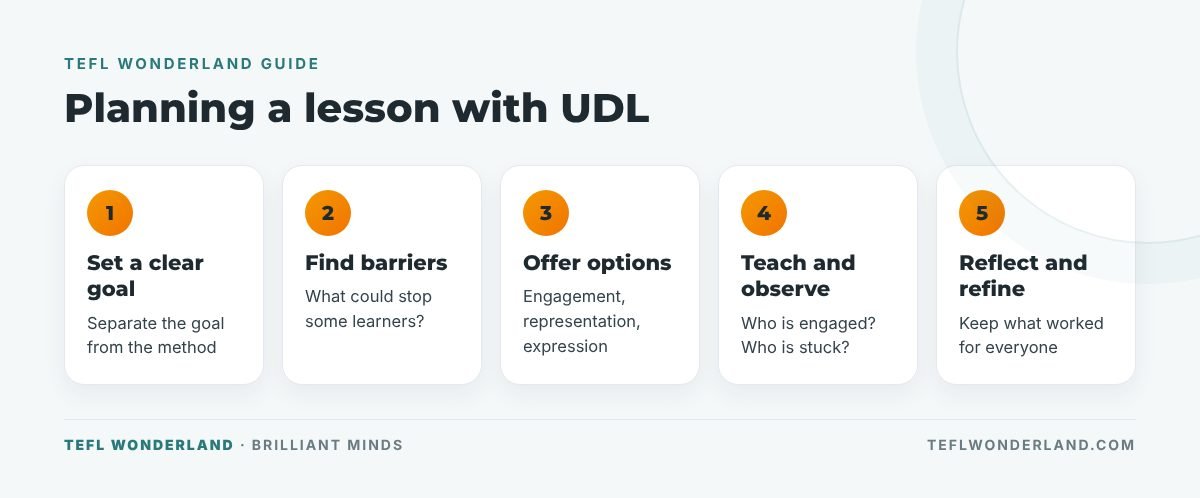
- Set a clear goal, and separate it from the method. If the goal is “explain the water cycle”, a poster, a talk and a paragraph can all show it.
- Identify likely barriers: reading level, attention, vocabulary, motor skills, confidence.
- Offer options for engagement, representation and expression where they matter most.
- Teach and observe: who is engaged, who is stuck, which options are used?
- Reflect and refine: keep what worked for everyone in future lessons.
UDL and differentiation
UDL and differentiation work well together. UDL designs flexibility in from the start for the whole class; differentiation adjusts teaching for specific learners or groups during the lesson. A UDL-designed lesson usually needs fewer last-minute adaptations.
UDL and accessibility
Accessibility makes sure that materials and environments can be used by people with disabilities: captions, alt text, readable fonts and contrast, keyboard-friendly digital tools. UDL goes further, addressing engagement and expression as well as access. Together, they help every learner participate fully.
Learn more about UDL
Our course Universal Design for Learning and Accessibility shows teachers how to apply the UDL principles in real lessons and digital materials. It is part of our teacher development courses, alongside Strategies for Differentiation and Effective Classroom Management.
FAQs
Is Universal Design for Learning only for students with disabilities?
No. UDL is designed for all learners. Options that remove barriers for some learners usually benefit many others too.
How do I start with UDL?
Choose one upcoming lesson, identify one or two likely barriers and add one option for each UDL principle. Build from there.
Does UDL lower standards?
No. UDL keeps the learning goal high and offers flexible ways to reach it. The aim is for more learners to meet the same goal, not an easier one.
References and further reading
- CAST (2024). Universal Design for Learning Guidelines version 3.0. udlguidelines.cast.org
- Meyer, A., Rose, D. H., & Gordon, D. (2014). Universal Design for Learning: Theory and Practice. CAST Professional Publishing.
- Rose, D. H., & Meyer, A. (2002). Teaching Every Student in the Digital Age: Universal Design for Learning. ASCD.