

Teaching English online gives you freedom: you can teach from home or while traveling, choose your hours and reach learners all over the world. But a webcam and a good internet connection are not enough. Here are eight practical steps to start teaching English online and do it well, from qualifications and equipment to lesson design and finding students.
1. Get a recognized qualification
Online schools and private students both want proof that you know how to teach. A TESOL or TEFL certificate with at least 120 hours is the usual minimum, and a regulated qualification is easier for employers to check. Our TESOL courses are fully online, self-paced and Ofqual-regulated at Level 3 and Level 5.
2. Set up your space and equipment
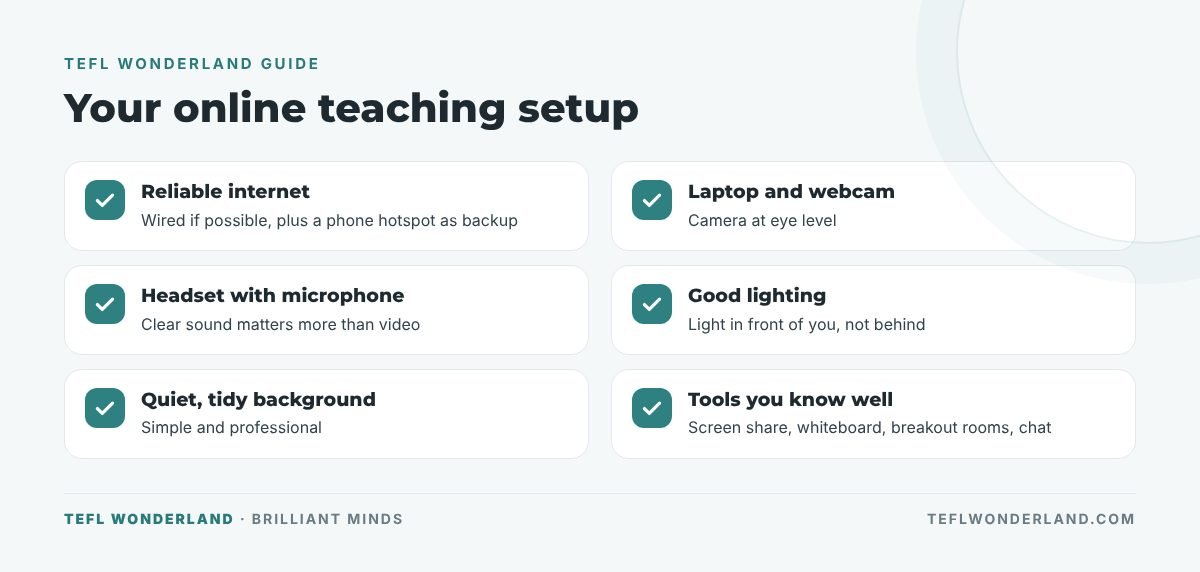
Test everything before your first lesson and keep a backup plan, such as a phone hotspot and a second device. Sound quality matters more than video: learners can follow a slightly blurry teacher, but not one they can’t hear.
3. Choose how you will work
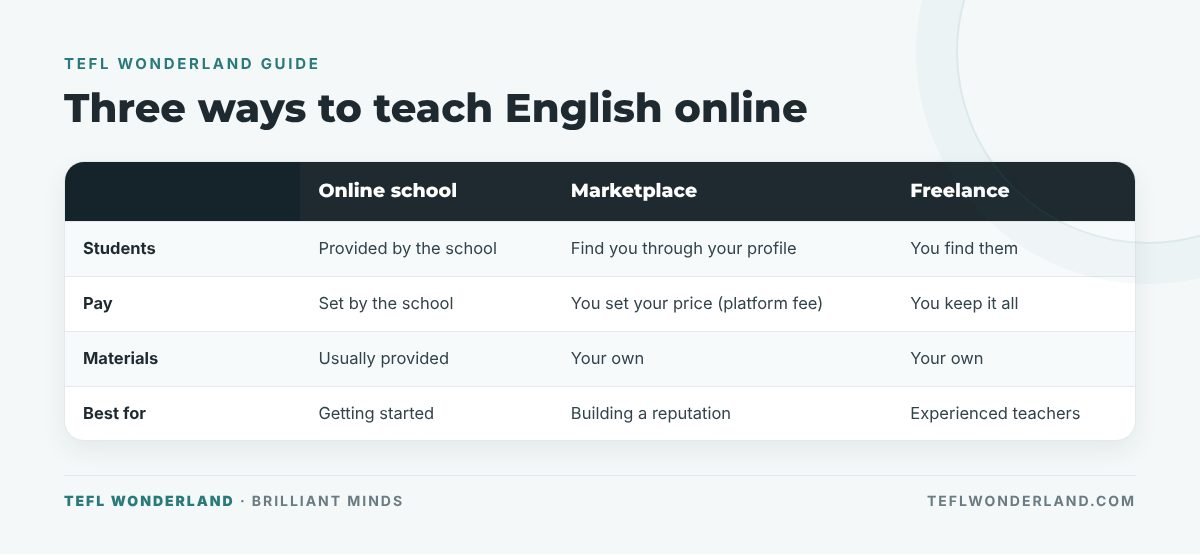
There are three common paths for teaching English online. Online schools give you students and materials but set the pay and schedule. Marketplaces let you set your price and build a profile, but take a commission. Freelance teaching means you find your own students and keep all the income, but you also handle marketing and payments. Many teachers start with a school or marketplace and gradually build their own students.
4. Learn the online tools
Master your video platform: screen sharing, breakout rooms, the whiteboard, polls and the chat. Add a few interactive tools for quizzes, flashcards and collaborative documents. The ISTE Standards for Educators describe the teacher as a designer and facilitator of digital learning, not just a presenter (ISTE), which is a helpful way to think about online lessons.
5. Design lessons for the screen
Online lessons need more interaction, not less:
- Short stages: change activity every 5 to 10 minutes.
- Visuals: images, short videos and clear slides with few words.
- Regular participation: ask learners to type, draw, choose or speak every few minutes.
- Clear aims: tell learners what they will be able to do by the end.
- Gamification: points, levels and quick challenges keep energy high.
Research on learning also suggests short, regular retrieval practice (quick quizzes on earlier lessons) strengthens memory (Roediger & Karpicke, 2006). Start each lesson with a two-minute review game.
6. Choose a niche
Specializing makes it easier to stand out. Popular niches include young learners, Business English, exam preparation (IELTS, Duolingo English Test, STEP) and conversation practice. Our CPD course Teaching Online, Business English, Young Learners and Test Preparation is designed for teachers moving into these areas.
7. Set your prices and policies
Research what teachers with similar experience charge. Decide your cancellation rules, payment method and packages (for example, 10 lessons at a discount) before you start, and write them down clearly for students.
8. Find students and grow
Create a simple profile with a friendly video introduction, ask happy students for reviews and share useful tips on social media. Word of mouth is still the strongest marketing for teachers. Keep a simple record of each student’s goals and progress, and show them their improvement regularly.
A sample 45-minute lesson for teaching English online
- Review game (5 min): quick quiz on last lesson’s words.
- Lead-in (5 min): a photo on screen and two questions.
- Input (10 min): a short video or text; notice the target language.
- Practice (10 min): breakout rooms with a clear task and a time limit.
- Speaking task (10 min): role-play or discussion, with the teacher noting errors in the chat.
- Feedback and homework (5 min): share good examples and two corrections.
Common challenges when teaching English online
- Technical problems: have a backup device and a plan B activity that needs no screen sharing.
- Time zones: use a scheduling tool that shows each student’s local time.
- Screen fatigue: keep lessons varied, and build in short breaks in longer sessions.
- Isolation: join online teacher communities to share ideas and stay motivated.
For free activities and teaching ideas, visit the British Council’s TeachingEnglish website.
FAQs
Can I start teaching English online without experience?
Yes, but a qualification with teaching practice will help you a lot. Our Premier TESOL courses include 20 hours of Guided Teaching Practice with real students on Zoom.
Do I need to be a native speaker to teach English online?
No. Many successful online teachers are non-native speakers with advanced English and a recognized qualification.
How many hours a week can I teach online?
That depends on you. Some teachers teach a few hours as a side income; others teach full time. Start small, build your routine and grow.
References and further reading
- ISTE. ISTE Standards for Educators. iste.org
- Roediger, H. L., & Karpicke, J. D. (2006). Test-enhanced learning: Taking memory tests improves long-term retention. Psychological Science, 17(3), 249–255. doi.org/10.1111/j.1467-9280.2006.01693.x
- British Council. TeachingEnglish. teachingenglish.org.uk
- Council of Europe. Common European Framework of Reference for Languages (CEFR). coe.int
Ready to start teaching English online? Choose your qualification on our TESOL courses page.